(01) PERSONA
Amanda Costa, NYC expansion agent
A composite luxury agent ($1M–$10M) assessing a Catskills expansion. Core job: assess a new market and share evidence-backed opportunities without adding admin work.
View in FigmaCONCEPT CASE STUDY · AI-ADAPTIVE WORKSPACE · 2026
A concept AI workspace for professionals. Myli turns a goal into a persistent, editable canvas, with sources, approvals and saved work built in, instead of another chat thread.
01 · THE PROBLEM & THE BET
Conventional assistants put the conversation at the center. Professional work also needs durable context, navigable information, visible evidence and control. Real estate agents use AI mostly for writing; analysis like market research and client briefs is still scattered across portals, documents and chats.
Stable structure, adaptive content. A predictable app shell where AI assembles comparisons, maps, charts and notes inside an information architecture people can understand, inspect and control.
35%
of agents find AI genuinely helpful, though 90% use it
47%
say checking AI output is their biggest AI time drain
30+ min
for most agents to build one comparative market analysis
Sources: HousingWire / Fyxer report (n = 89, directional); RISMedia, homegenius/RRC 2022. Full list in the PRD.
02 · RESEARCH & STRUCTURE
A composite persona, patterns from enterprise workspaces, and a navigation model that never changes when AI does.
(01) PERSONA
A composite luxury agent ($1M–$10M) assessing a Catskills expansion. Core job: assess a new market and share evidence-backed opportunities without adding admin work.
View in Figma(03) JOURNEY MAP
Six stages, from a client's first question to a saved market outlook. The riskiest moments: unclear sources, switching tools and losing unfinished work, all hypotheses to validate with agents.
View in Figma(02) COMPETITIVE PATTERNS
Benchling and Dotmatics keep complex work inspectable: persistent objects, linked records and contextual actions instead of one global prompt.
View in Figma(04) SITEMAP
Home, Workspaces, Settings, Account. Industries live inside Workspaces, so adding one never changes the shell, and a breadcrumb always shows where you are.
View in Figma03 · BRAND IDENTITY
The name, logo, palette and type all come from one idea: Myli moves through complex work the way a manta ray moves through the ocean.

(01) NAMING
I explored name options for the app online: animals, words in other languages, etc. — looking at their meaning specifically. Myli stayed because of the manta ray it evokes: an ocean animal that adapts to its surroundings and moves with the agility the product needed. Even though this name is already taken, I thought it was ok to use for this case study.
(02) LOGO
I designed the M mark to carry the movement of an ocean wave. It stays legible when the sidebar collapses to an icon-only rail.
(03) COLOR PALETTE
Ink and ocean blues carry stability, trust and focus. Reef colors give each content type its own family across the canvas.
Deep ink
#081D2B
Ocean 700
#176A9C
Ocean 400
#69B8D7
Ocean 100
#E2F3F8
Off-white
#F6F9FA
Urchin Lavender
#ECE8F6
Kelp Sage
#E6F0E8
Sea Glass
#DFF1EF
Coral Mist
#F5E4DF
Shell Sand
#F3EBDD
(04) TYPOGRAPHY
Cormorant Garamond's calligraphic serif gives headings an elegant, feminine voice. Manrope keeps navigation, controls and UI copy clear.
An interface that adapts to the work.
Cormorant Garamond · headings H1–H3
Ask Myli to refine this analysis
Manrope · navigation, controls and UI copy
04 · ITERATION
Paper sketches came first. Wireframes explored navigation states, box resizing, generation and maps; high-fidelity rounds reset the visual identity.
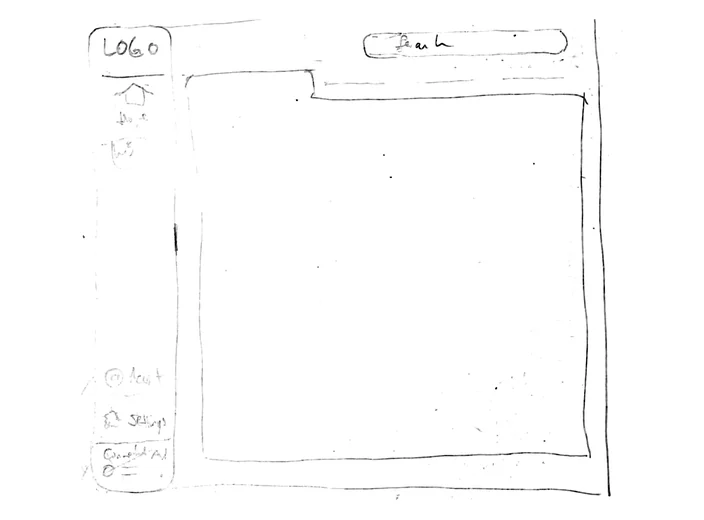
Early layout ideas, worked out on paper before Figma.
Canvas tests for navigation, box resizing, generation and maps.
Ocean-and-reef identity, sources on every figure.
KEY DECISIONS
The first dark menu read as generic AI SaaS. The ocean-and-reef identity gives Myli a calm, editorial character.
Familiar for parallel work, and resuming is obvious without learning a new 'booklet' metaphor.
The adaptive canvas, Saved Work and approvals need full control of the interface.
05 · FINAL DESIGN
Onboarding, the adaptive Market Intelligence canvas and Saved Work, on desktop and mobile.
(01) ONBOARDING
Profile, optional document upload, then a review of what Myli extracted. Skipping never blocks setup.
View in Figma(03) SAVED WORK
A permanent Saved Work tab, pinned last. Reopened canvases keep their full state.
View in Figma(02) ADAPTIVE CANVAS
Myli assembles a market comparison, research notes, a price chart and a map brief. Every box shows its source and freshness, and can be moved, resized or removed.
View in Figma(04) MOBILE
Boxes stack in one column and move up or down. Four screens designed so far; source and approval sheets are next.
View in Figma06 · DESIGN SYSTEM
The Myli Base Design System extends the Obra shadcn/ui kit with AI-adaptive patterns, so generated layouts stay predictable, accessible and consistent.
5 AI-ADAPTIVE PATTERN SETS
COLOR MEANS CONTENT TYPE
NEXT PROJECT
A UX overhaul for The Global Center for Climate Justice that helps visitors find what they need, and act, faster.
View the proposal